FriendCaster Pro for Facebook v5.3.1
5.3.1 – change for posting to friend’s walls based on Facebook API changes
+ Added support for tagging users in posts to group walls, event walls, and page walls.
+ Added better support for accessibility options
+ Fixed event attendees not getting loaded
+ Zipped posts are now handled in the widget properly
+ Fixed error when adding friend
+ Several other bug fixes and performance improvements
Friendcaster Pro for Facebook 5.3.1, Friendcaster is the #1 third party Facebook app available for Android with over 3,000,000 downloads and thousands of positive reviews.
Version 5.0 is sporting a beautiful interface, loads of Facebook features and the only real time Facebook notifications available through Google Play. When it comes to getting your Facebook “fix” on Android, Friendcaster is the way to go, and it’s free!
With Friendcaster we’ve also put in thousands of hours making the app VERY fast. Tired of waiting on the Facebook app to update? Go with Friendcaster!
If features are what you’re after, we’ve got em:
★ All your favorite Facebook features (status updates, photos, messages, events, groups, checkins, etc)
★ Instant real time notifications (much faster than any other Facebook app)
★ Full news feed
★ Comment, post and like comments
★ 5 beautiful themes, and growing!
★ Quick access to posting status updates, photos and video
★ Quick access to checkins
★ Beautiful checkin map of all your nearby friend’s locations
★ Easily view your news feed based on your Facebook friend lists
★ Displays your full size cover photo on the app opening screen
★ Support for multiple accounts
★ Hi-res photos directly in the news feed
★ Quick and easy setup assistant for notifications
★ Designed specifically for Android and Ice Cream Sandwich
★ And hundreds of additional features throughout the app… give it a try!
Facebook will never be the same once you’ve used this app. Keep up with friends and family faster with Friendcaster for Facebook.
Got a Facebook feature you’d like to see or something you think would make the app better? We listen and respond to your feedback every day in an effort to continue making this the best app available for Facebook on Android.
Smart Memory Booster Pro 1.41 For Android


Smart Memory Booster Pro 1.41 For Android
Smart Memory Booster Pro 1.41 For Android
Current Version: 1.41
Requires Android: 2.0.1 and up
Category: Tools
Size: 2.0M
What’s in this version:
Ver 1.34
- Fixed force close when changed theme
Ver 1.3
- Added Vietnamese language
Ver 1.2
- Added spanish language
Ver 1.1
- Fixed start-up lag
Ver 1.0
- Supported themes, onClick options
Ver 0.91
- Fixed force close on Cache Cleaner
Ver 0.90
- First release
Facebook: https://www.facebook.com/DroidMate
Details:
- Speed up your devices! Prevent battery drain
- Smart Memory Booster – Android RAM Optimizer to speed up your devices as well as prevent battery drain!
- Smart Memory Booster reclaims lost memory for your programs by defragmenting your smartphone’s memory as well as stop apps that runs on background and drain your battery.
- It is designed to tackle the difficult yet crucial problem of memory management for all Android devices.
- There are 5 ways to boost memory
☆ Auto smart boost – boost when device meets certain conditions, such as free memory amount, importance of an app, or how many memory that an app consumes
☆ Floating widget – Enable Memory Booster floating widget (on by default) to one tap boost anywhere
☆ Home screen widget – Add a widget from home screen
☆ Notification – one tap to boost (toggle notification boost bar visibility in app’s setting)
☆ Boost Now button – tap this button from app’s main screen
There are many advanced options to tune boosting process:
☆ Boost level: select among 5 boost levels
☆ Ignored apps: apps will not be stopped when boosting
☆ Report style-define how to show reports
☆ Boost automatically: auto-boost, come with minimal Memory threshold and Boost interval
☆ Feedback – a haptic feedback when touch on boost widget
☆ Floating widget position/size/transparency – Change overlay widget position/size/opaque level
☆ Notification – Show memory info with report/auto refresh settings
Thanks to : Nextwap for description
Jelly Bean Keyboard PRO v1.9.2 APK

- Themes: compatible with GO keyboard themes, Better Keyboard themes, and most keyboard themes on the market!
- Fonts: change keyboard fonts!
- Key height, width, key size customizations!
- No annoying ads!
- Help developer feed his kids!
Jelly Bean Keyboard - The keyboard from Android 4.1 Jelly Bean
This is the keyboard from Android 4.1 (codename Jelly Bean). I back ported it to work with all android deivces 1.6 and up. Everything is working except Speech Recognition will require android 2.2 or higher.
This essentially the same Jelly Bean Keyboard you will find in Android 4.1 but I made a few minor adjustments to it to make it work a little better.
It's even better than the original Jelly Bean keyboard:
- Compatible with most android devices
- Features that are incompatible with older phones were removed to make the keyboard faster
- Bigger Keys!
- Reduced app size by exporting non-English languages as separate downloads
- More user friendly
Supported 40+ languages layout:
English, English UK, Arabic, Belarusian, Bulgarian, Bulgarian BDS, Croatian, Czech, Danish, Dutch, Estonian, Finnish, French (Canada), French QWERTY, Georgian, German, Greek, Hebrew, Hindi, Hungarian, Icelandic, Italian, Kirghiz, Latvian, Macedonian, Norwegian Bokmal, Persian, Polish, Portuguese (Brazil), Portuguese, Romanian, Serbian, Slovak, Slovenian, Spanish, Swedish, Thai, Turkish, Ukrainian, Vietnamese
Screenshot :


Update SNC Error 06 Januari 2013
Langkah-langkah agar Paket SNC Error Update 06 Januari 2013
1 . Siapin kartu tsel
2 . akses *116# pilih 4
3 . Beli deh paket sesuai kantong
4 . Pake deh browsing DLL
5 . jam 7-8 malam Bom sms dengan format FB1 ke 3636 100 kali ( saran pakek Sms Bomber biar gacape )
6 . Masuk TSEL menu terus perubahan data
7 . Matiin Hape teyus BOM lagi 200 sms
8 . Matiin hape hidupin jam 9 pagi
9 . Good Luck !!
10 . Agak ribet sich tapi gampang kok :)
Download SMS Bomber
Java : Download , untuk java ada tutorial dalam mengintsalnya , Tutorial 1 & Tutorial 2
Symbian : Download , untuk symbian dibutuhkan Phyton
Android : Download
CR Player Pro v1.0 APK
HAPPY NEW YEAR 2013

- Browse and play music/video from app, or from other file explorers.
- Create favorite list of your music/video.
- Create list for TV channels, create favorite list.
- We didn't provide channels links.
- More features inside of player :)
Supported video codecs:
- mp4, wmv, avi, mkv, dv, rm, mpg, mpeg, flv,
- divx, swf, dat, h264, h263, h261, 3gp, 3gpp,
- asf, mov, m4v, ogv, vob, ts, webm... HD videos..
Supported audio codecs:
- mp3, wma, ogg, mp2, flac, aac, ac3, amr, pcm,
- wav, au, aiff, 3g2, m4a.
Supported for audio/video streams http, rtp, rtsp, mms, udp,.. and more..
Supported processors:
- armeabi
- armeabi-v7a
- x86
- mips
Screenshots :


Spyware Shield v1.0 APK

- Annoying ads
- Location tracking
- Wasted memory
- Slowing down device
- Key Logging
- Data collecting
- Website tracking
- Steal bank and account password
- Facebook tracking
Why use Spyware Shield?
- Real time notifications
- Won‘t slow device down
- Minimum battery usage
- Auto detection
- Scans apps and system apps
- Easy to use
- Low file size
- Updates every two weeks
- For phones and tablets
Screenshots :


Download : 272Kb APK
Proxy Ngebut Opmin & BH T-Sel

Download Proxy Ngebut Opmin & BH T-Sel Update Tanggal 23 Desember 2012 Uploaded by Arief Corporation Download trik DISINI
Sacred Guns v1.1.3.8 APK

When God decided to send a Great Flood to wipe sin from Earth, he assigned Noah to construct the Ark to keep him and the animals safe from harm... and YOU, the Archangel Mark Leung, to keep His unwanted creations out of the Ark.Wield up to 5 angelic weapons and keep Noah's Ark clean from those filthy, forsaken creatures--those that are too depraved, too ugly or too sickeningly cheerful to be saved. May your guns blaze righteously. Amen!Watch up to 12 full-voiced, hand-drawn cutscenes, complete with a secret ending!
Controls: Thumb 1 AIMS, Thumb 2 FIRES. Tap weapon to switch.
Upgrade yourself and your weapons between battles: Health, Power, Firing Rate, Mana Cost.
Tactical fun: Manage your mana wisely with 5 deadly weapons. Some even charge automatically for even more powerful shots!
- Improved graphics
- Improved aiming
- Improved bosses
- Improved cutscene timing
- Made tragic ending even sadder
Screenshots :


Download : 92Mb (APK+OBB)
NodeBeat v1.3.7 APK

NodeBeat, one of the top iOS music apps, has come to Android !
Audio Features:
- 20 Musical Scales
- All 12 Musical Keys Signatures
- 7 Octave Range
- Background Keyboard/Piano
- Audio Waveform Adjustment (Sine, Triangle, Sawtooth, Square)
- Creative Sound Sculpting (Echo, Attack, Decay, Release)
Rhythm Features :
- Adjustable Tempo
Sharing/Exporting Features
- Record and email audio file
- Save/Load Creations
General Features :
- Adjustable Node Physics (gravity, speed, proximity)
- Drum and Octave Generators
- Start/Stop Nodes by double tapping
- Sleep Timer for falling asleep to NodeBeat
What's in this version: (Updated : Dec 21, 2012)
- Fix for orientation not updating
Required Android O/S : 2.2+
Screenshot :


Download : 7Mb APK

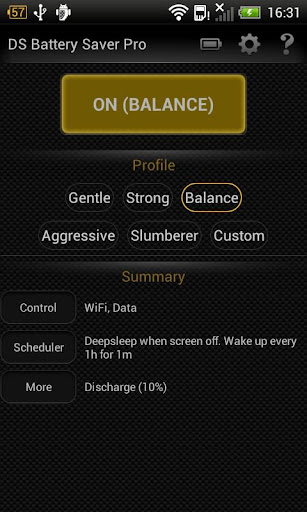
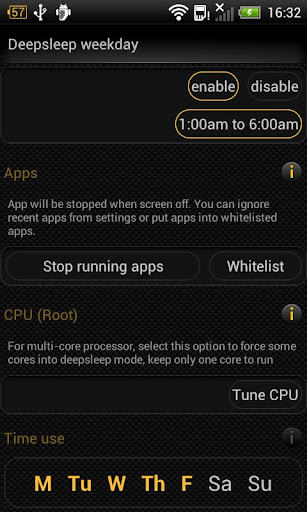
Deep Sleep Battery Saver Pro v1.31 APK

- 5 pre-defined profiles: Gentle, Balance, Strong, Aggressive, Slumberer. They varies on frequency, duration and other settings. The former is less disruptive, but save less battery and vise versa
- Custom profile (PRO) - for advanced users. If you need more customization, select this profile and modify it
- Custom profile settings :
- Separate between weekday vs weekend settings
- Frequency: device is turned on DS mode at a selected frequency
- Duration: device is woke up after for a selected duration after a each frequency cycle
- Wileless & network: control radio setting during DS on
- Sync: Control sync strategy and sync account, auto-sync
- Apps: Select apps that will be stopped during DS on
- CPU: Process twist - root only
- Night period: During this period, device is always in DS mode
- General settings
- Screen off delay: a short delay before DS start. This option is used to avoid quick screen toggles
- Whitelist: Apps are always ignored when DS on, such as online music player
- Ingored recent apps: ignore recent apps
- Use APN settings: twist 3G/4G/mobile data toggler
- Check background data: If selected, it will ignore DS mode if traffic is above a defined threshold
General Setting
- Traffic threshold & traffic sampling frequency
- Screen off delay: a short delay before DS start. This option is used to avoid quick screen toggles
- Whitelist: Apps are always ignored when DS on, such as online music player
- Ingored recent apps: ignore recent apps
- Use APN settings: twist 3G/4G/mobile data toggler
- Check background data: If selected, it will ignore DS mode if traffic is above a defined threshold
- Traffic threshold & traffic sampling frequency
Notice:
- During deep sleep mode on, this app may disrupt your normal activities, such as your email notification comes with larger delay
- If your setting (ex. Wifi) is off, DS Battery Saver does not control it during DS mode on
Languages: English, Français, Tiếng Việt
What's in this version: (Updated : Dec 21, 2012)
- Fixed force close when clicks on widget
- Fixed no action when clicks on notification
- Fixed deep sleep when discharge/recharge options
Required Android O/S : 2.1+
Screenshots :
Size 442KB
Cara setting XL supaya gratis ALL APPS
Halo sobat gratisan ketemu lagi sama ADMIN , kali ini saya mau share Cara Setting XL Supaya Gratis settinganya udh dibungkus
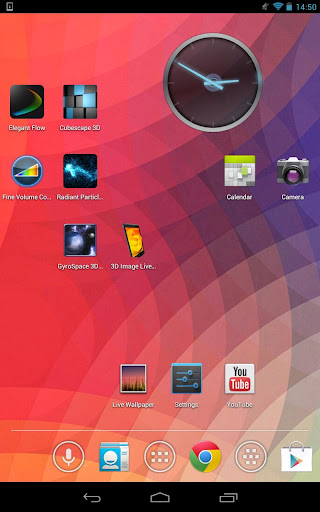
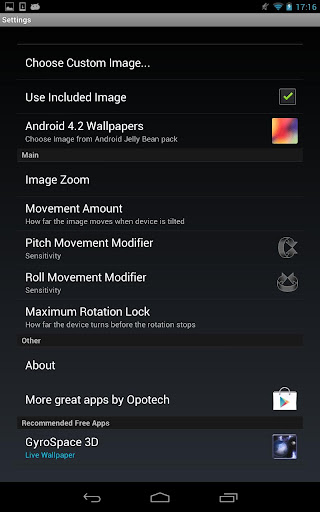
3D Image Live Wallpaper v1.0.3 APK

What's in this version : (Updated : Dec 19, 2012)
- Black bars fixed
- Landscape/tablet scrolling fixed
- Asus Transformer TF700 fix
- Optimisations
- UI changes
- Fixed bug: settings ignored on reboot
- Fixed Force close bug
- Further fixes for tablets/black bars: Custom images need to be re-picked
- Changed settings background colour
- Renamed Movement amount to Sensitivity
Required Android O/S : 2.3+
Screenshots :
Trik Internet Telkomsel 20 Desember
Siang semua di post ini saya ingin bagiin trik internet telkomsel tapi ingat trik ini hanya untuk pengguna Opera Mini Handler dan Opera Executioner
↓
↓
↓
↓
↓
↓
Cara ROOTING ANDROID
Cara Root Android (Berlaku untuk semua jenis dan tipe HP Android).
Sebelum saya jelaskan lebih detail mengenai cara root Android, saya akan
berikan penjelasan lebih dulu mengenai apa itu root (rooting) Android
dan fungsi dari root Android. Fungsi dari root (rooting) Android adalah
agar Anda sebagai pengguna ponsel Android memiliki hak akses penuh ke
sistem Android pada ponsel yang Anda miliki. Dengan melakukan Root, anda
dapat menambah, mengurangi maupun memodifikasi file-file atau data-
data yang terletak pada sistem Android yang bila dalam keadaan standar
(belum root) file-file tersebut tidak dapat di akses. Jika anda sering
menginstal aplikasi di ponsel Android, Anda pasti sekali waktu
menemukan ada beberapa aplikasi yang tidak bisa dijalankan dan
memerlukan ponsel untuk root. Sebagai contoh saya menginstal aplikasi
screenshot di Samsung Galaxy Mini, bernama Shootme. Akan tetapi aplikasi
tersebut tidak bisa digunakan karena ponsel Galaxy Mini saya belum
di-root. Lalu apa keuntungan dan kerugian melakukan root pada ponsel
android? Salah satu kerugiannya adalah garansi menjadi tidak berlaku,
ada juga yang bilang bahwa dengan melakukan root, ponsel android menjadi
rawan terkena malware (yang satu ini masih menjadi perdebatan). Tapi
tenang, saudara-saudara, karena ponsel android yang sudah root,
bisa di- unroot dan garansi berlaku kembali, hehe. Keuntungan root pada
ponsel Android adalah, Anda memiliki hak akses ke sistem Android. Dapat
menginstal aplikasi-aplikasi yang memerlukan root, dapat
menginstal Custom ROM (sistem operasi Android kustom (alternatif) atau
bukan buatan vendor ponsel), melakukan overclock processor untuk memaksimalkan kinerja ponsel, dan bisa menghapus aplikasi bawaan pabrik
yang tidak berguna. Oke, semoga pada ngerti dengan apa itu root
(rooting) android yang sudah saya jelaskan dengan ngawur :D Sekarang
mari kita enginjak ke menu utama kita kali ini yaitu cara root Android .
- Langkah pertama adalah menginstal aplikasi UnlockRoot pada komputer Anda yang bisa di download disini (password RAR : slipknot123)
- Kalau sudah diinstal, siapkan kabel data (USB), kalau belum punya, beli dong :p
- Lakukan settingan Debugg USB di ponsel Android, caranya masuk ke Settingan/
Pengaturan >> Aplikasi >> Development/ Pengembangan >> centang “Mode USB debugging..” - Hubungkan Android dengan PC/ Laptop menggunakan kabel USB yang sudah dibeli tadi :)
- Jalankan aplikasi UnlockRoot yang sudah didownload di langkah pertama tadi. Tunggu beberapa detik agar aplikasi mengenali perangkat ponsel Android Anda.
- Klik tombol ROOT pada aplikasi. Silahkan tunggu proses rooting sedang berjalan. Anda bisa sambil menyalakan rokok, saya sambil merokok Djarum Super disini.
- Biasanya di tengah proses rooting ada tawaran untuk menginstal aplikasi penghemat batterey, Anda boleh menerima tawaran tersebut boleh juga menolak.
- Kalau proses selesai biasanya ada tulisan Rooted di bagian paling bawah.
- Setelah itu ada perintah untuk REBOOT perangkat Android, klik oke saja.
- Selesai, ponsel Android Anda sudah ROOT sekarang. Dalam percobaan di atas, saya menggunakan Samsung Galaxy Mini . Kalau saya lihat daftarnya, hampir semua tipe ponsel Android bisa di- root dengan aplikasi UnlockRoot ini. Selamat mencoba cara root hp Android di atas, semoga berhasil seperti saya.


